Moises: The Musician's AI App


50M+
Installs
Moises Systems
Developer
-
Entertainment
Category
-
Everyone
Content Rating
-
https://app.moises.ai/privacy
Privacy Policy
editor reviews
As a long-time musician and producer, I've tested countless apps promising to revolutionize how we interact with music, but none have delivered quite like Moises: The Musician's AI App. Developed by Moises Systems, this tool leverages cutting-edge artificial intelligence to separate stems, adjust tempo, and detect chords with uncanny accuracy. The first time I uploaded a dense rock track and instantly isolated the vocals, bass, and drums, I was genuinely floored. It feels like having a professional audio engineer tucked right into your pocket. The user interface is clean, intuitive, and surprisingly fast, even on older devices. I choose Moises over competitors like Vocal Remover Pro or LALAL.AI because it combines multiple essential tools—stem splitting, pitch shifting, metronomes, and chord detection—into a single, seamless platform. Other apps might excel in one area, but Moises masters them all, saving me time and reducing app-switching fatigue. My usage experience has been transformative. When practicing piano at home, I can strip away the lead guitar from a song to create a backing track. At rehearsals, the drummer uses the tempo adjustment to solidify tricky transitions. For quick cover song arrangements, the chord analyzer provides near-instant results. It's not just a tool; it's a creative companion. The development team clearly understands musician pain points, as updates continually refine the AI's accuracy and add user-requested features. If you're struggling with audio manipulation or just want to unlock new dimensions in your practice and production, this is the software you've been waiting for. Stop wrestling with clunky DAWs or unreliable free utilities. Download Moises today and experience firsthand how artificial intelligence can elevate your musicianship.
The user experience is where Moises truly shines, and it's why I've stuck with it through multiple updates. The app doesn't bury you under menus or jargon. Once you're in, the main dashboard presents your library of imported songs with clear options: stem separation, chord detection, and a master tempo/pitch control. Swiping through tracks feels snappy, and the AI processing happens surprisingly quickly, usually within 10-20 seconds for a typical four-minute song. This speed is a game-changer. In rehearsal, waiting for processing can kill momentum, but Moises keeps the flow going. I also appreciate the playback engine. You can solo or mute individual stems (vocals, piano, strings, etc.) in real-time and even adjust their volume independently. This level of granular control is usually reserved for expensive desktop software, yet Moises delivers it on a mobile interface. The audio quality of the separated stems is also impressive. While it's not completely artifact-free—some low-frequency muddiness can creep in on complex mixes—it's far better than I've experienced with free web tools. For practice and quick demos, the quality is more than acceptable. The chord detection feature is a particular standout for a music theory nerd like me. It accurately identifies chords (major, minor, diminished, suspended) and shows them synced to the timeline. This is incredibly helpful for transcribing or analyzing a song's harmony.
The reason I ultimately committed to Moises over other similar software comes down to its comprehensive feature set and reliability. Apps like Vocal Remover Pro offer bare-bones stem splitting, but they lack chord detection and precise pitch shifting. BandLab is great for recording but doesn't specialize in AI audio separation. LALAL.AI produces clean results but operates more as a one-trick pony. Moises, by contrast, is a Swiss Army knife for musicians. It handles the core task of stem separation with excellent fidelity, then layers on educational tools like chord detection and practical tools like metronomes, count-ins, and custom BPM adjustments. The premium subscription unlocks unlimited processing and higher-quality exports, which I find worth the cost for professional use. But even the free tier gives you a generous taste of the app's capabilities. For any musician—from a beginner learning to play by ear to a seasoned producer looking for sample isolation—Moises offers a powerful, user-friendly gateway. It has genuinely changed how I practice, perform, and create. I can't recommend it enough. Join the thousands of musicians who have already made it a staple in their toolkit. Download Moises: The Musician's AI App from your app store today and unlock your full musical potential.
features
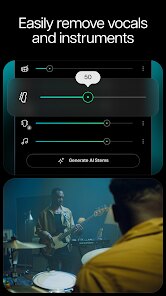
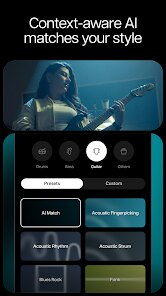
- 🎵 Seamless AI Stem Separation: Moises uses advanced machine learning algorithms to isolate vocals, bass, drums, and other instruments from any audio file with remarkable clarity. I've tested it on everything from 70s rock to modern EDM, and the separation is consistently clean. You can then solo, mute, or adjust the volume of each stem independently, giving you complete control over a mix without needing a full digital audio workstation.
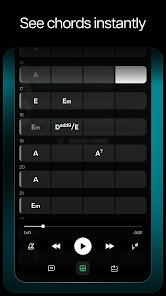
- 🔍 Real-Time Chord Detection: The app analyzes audio and displays chord names (like G, Am, Cmaj7) perfectly synced to the song's timeline. This feature is a lifesaver for learning songs by ear or analyzing harmonic structures. I often use it to transcribe pieces I'm studying, and the accuracy has improved dramatically with recent updates.
- ⏩ On-the-Fly Tempo & Pitch Shifting: You can adjust the speed of a track from 25% to 200% without affecting the pitch, or change the key up or down by up to 12 semitones. This is perfect for practicing tricky solos at a slower tempo or transposing songs into a comfortable vocal range. The audio quality remains surprisingly intact even with heavy adjustments.
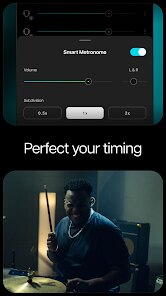
- 🎛️ Interactive Metronome & Count-In: A built-in metronome syncs to the detected tempo of your track. You can set a count-in to help you start playing on time. This feature turns any song into a structured practice session, helping you lock in rhythm and timing more effectively than a generic metronome app ever could.
pros
- 🌟 Incredibly User-Friendly Interface: The layout is clean, intuitive, and designed for musicians who want to get to work fast. I never have to hunt for settings or dig through confusing menus. Importing a song is a breeze, and all major features (stem separation, chord detection, pitch/tempo controls) are accessible from the main playback screen.
- 🚀 Fast and Efficient Processing: One of my biggest pet peeves is waiting for software to process files. Moises is remarkably quick. Most 3-4 minute songs are fully processed for stem separation within 10-20 seconds on a decent connection. This speed makes it practical for both spontaneous practice and organized rehearsal sessions.
- 🎤 Excellent Audio Quality for Practice: While not perfect for professional mastering, the output quality is more than sufficient for learning, practicing, and creating demo backing tracks. The isolated stems are crisp and free of major artifacts. The pitch-shifted audio also holds together well, without the metallic or robotic timbres common in other apps.
cons
- 📱 Limited Offline Functionality: The heavy lifting is done via cloud servers, so you need a stable internet connection for initial processing. If you're in a remote area with poor connectivity, you won't be able to separate stems or detect chords on new songs. Some locally cached files can be played, but the core features are heavily web-reliant.
- 💸 Premium Subscription for Pro Use: The free tier is generous but has limits on processing time and export quality. To unlock unlimited processing, high-quality audio exports (like WAV files), and advanced features like click tracks for each stem, you need a paid subscription. For hobbyists this might be fine, but professional users will likely feel pressured to upgrade.
- ⚠️ Occasional Artifacts in Complex Mixes: When dealing with dense, heavily layered tracks—like full orchestral pieces or metal with blast beats—the stem separation can sometimes introduce slight artifacts like crackling or a loss of clarity in the low-end. It's still usable for practice, but purists may find the results slightly muddy compared to isolated studio tracks.
Articles
![]()
How to Get Robux Safely Without Scams
![]()
How to Download Older Versions of Android Apps
![]()
How to Download Games on Google Play for the First Time
![]()
What Is an APK File for Android? Everything You Need to Know
![]()
Do Free Robux Generators Work?
![]()
Robux Pricing Guide (2026 Update): How Much Robux Really Costs
![]()
How to Avoid Scams in Roblox
![]()
Rarest Pets in Adopt Me! (2026 Update)
![]()
How to Trade Safely in Adopt Me! (So You Don't Lose Everything)
![]()
Secret Tricks Nobody Tells You in 'Steal a Brainrot'
![]()
Beginner Guide: Don't Lose Your Brainrot
![]()
How to Steal in 'Steal a Brainrot' Without Getting Caught (Or at Least Not Instantly)
![]()
Is Brookhaven RP Worth Playing? It Depends on What You’re Looking For
![]()
Why Blox Fruits Is So Popular? Here’s Why Everyone Keeps Playing It
![]()
Best Roblox Obby Games for Beginners (2026): Learn the Game Without Hitting a Wall
![]()
Top 10 Roblox Horror Games (2026): The Scariest Experiences You Can't Miss
















Hot Apps
-
![]()
OfferUp: Buy. Sell. Letgo.
OfferUp Inc.4.4
-
![]()
WhatsApp Messenger
WhatsApp LLC4.2 -
![]()
Waze Navigation & Live Traffic
Waze3.9
-
![]()
Blink Home Monitor
Immedia Semiconductor4 -
![]()
Google Maps
Google LLC4.2 -
![]()
ChatOn - AI Chat Bot Assistant
AIBY Inc.4.4 -
![]()
Telegram
Telegram FZ-LLC4.2 -
![]()
Google Chat
Google LLC4.4 -
![]()
Affirm: Buy now, pay over time
Affirm, Inc4.7 -
![]()
Ford™
Ford Motor Co.4.7 -
![]()
ChatBot - AI Chat
X PhotoKit4.5 -
![]()
ChatGPT
OpenAI4.7 -
![]()
PayPal - Send, Shop, Manage
PayPal Mobile4.3 -
![]()
GroupMe
GroupMe4.5 -
![]()
TikTok
TikTok Pte. Ltd.4.4 -
![]()
Signal Private Messenger
Signal Foundation4.5 -
![]()
Microsoft Copilot
Microsoft Corporation4.8 -
![]()
Afterpay - Buy Now Pay Later
Afterpay3.8 -
![]()
Amazon Fire TV
Amazon Mobile LLC4.1 -
![]()
Facebook
Meta Platforms, Inc.4 -
![]()
PolyBuzz: Chat with AI Friends
CLOUD WHALE INTERACTIVE TECHNOLOGY LLC.3.8 -
![]()
Snapmint: Buy Now, Pay in EMIs
Snapmint4.5 -
![]()
DeepSeek - AI Assistant
DeepSeek4.2 -
![]()
Hulu: Stream TV shows & movies
Disney4.5 -
![]()
TikTok
TikTok Pte. Ltd.4.4 -
![]()
Uber Eats: Food Delivery
Uber Technologies, Inc.4.3 -
![]()
PayByPhone
PayByPhone Technologies Inc .4.9 -
![]()
ParkMobile: Park. Pay. Go.
Parkmobile, LLC4.3 -
![]()
FaceApp: Perfect Face Editor
FaceApp Technology Ltd4.4 -
![]()
SiriusXM: Music, Sports & News
SiriusXM4.6






























Disclaimer
1.Appinfocenter does not represent any developer, nor is it the developer of any App or game.
2.Appinfocenter provide custom reviews of Apps written by our own reviewers, and detailed information of these Apps, such as developer contacts, ratings and screenshots.
3. All trademarks, registered trademarks, brand names and company names or logos appearing on the site are the property of their respective owners.
4.Appinfocenter abides by the federal Digital Millennium Copyright Act (DMCA) by responding to notices of alleged infringement that complies with the DMCA and other applicable laws.
5.If you are the owner or copyright representative and want to delete your information, please contact us [email protected].
6.All the information on this website is strictly observed all the terms and conditions of Google Ads Advertising policies and Google Unwanted Software policy.
7.Appinfocenter.com is an independent, information-only website which is 100% free to all the users.